

Listen to Full Article
ReadyFull article audio (5 min) • Click to listen from start to finish
Read Selection (0 words)
"..."
Ch: How To Set Up a Mega Backdoor Roth With Empower
Mega Backdoor Roth Decision Tree & Math Matrix
A 1-page visual guide to after-tax 401(k) space calculations, employer match buffers, and automated conversion protocols.
- ✓ Exact 2026 total 415(c) math ($71,000)
- ✓ Empower 855-756-4738 conversion request script
- ✓ In-plan Roth vs. external rollover checklist
Your PDF is Ready!
Click below to download or save your printable companion guide:
We also sent a backup copy to your email. Keep this checklist handy for retirement and tax planning!
Step 1: Confirm After-Tax & Rollover Support at Empower
Log into empowermyretirement.com (or browse our Employer 401(k) Benefits Directory) and check two rules inside My Account → Plan Details / Summary Plan Description:
- After-Tax Source: Under Contribution Rate settings, verify there is a line specifically labeled After-Tax (separate from Pre-Tax and Roth 401(k)).
- Conversion Permission: Confirm the plan permits either In-Plan Roth Conversions or In-Service Withdrawals of after-tax balances (note whether there is a per-year frequency limit like 2x or 4x/year vs. unlimited).
Step 2: Set Your After-Tax Payroll Percentage
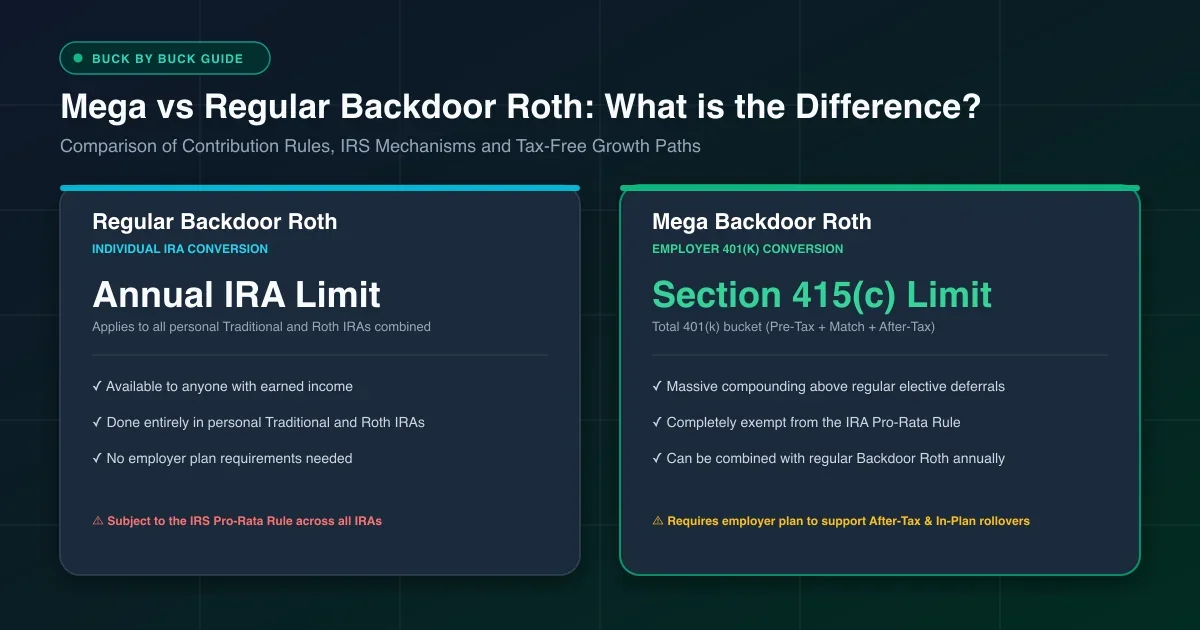
Run your salary and employer match numbers in the Mega Backdoor Roth Calculator first so your regular deferrals plus after-tax deferrals leave room for every dollar of employer match beneath 2026's $71,000 combined limit.
Step 3: Enable Automated Sweeps or Call Empower (855-756-4738)
Empower plans vary widely depending on employer configuration:
- If Online Conversion Exists: Under Manage → In-Plan Roth Conversion / Rollovers, toggle on automatic future after-tax conversions (or submit online sweeps whenever deposits settle).
- If Phone Request Required: Call Empower Participant Services at 855-756-4738. Ask: "Does my plan support standing automated in-plan Roth conversions for future after-tax deposits? If not, I would like to convert 100% of my settled after-tax source to Roth now."
Step 4: Invest Converted Roth Funds & Verify Form 1099-R
Allocate your converted Roth balance into your lowest-fee institutional index funds inside the Empower menu. In January, look for Form 1099-R IRS tax form issued by your 401(k) custodian reporting retirement conversions. Box 5 shows your non-taxable after-tax basis so you only pay tax on Box 2a gains. , confirming Box 5 accurately subtracts your already-taxed basis.
Frequently Asked Questions
Quick answers to common questions, technical edge cases, and tax rules.
Does Empower allow automated Mega Backdoor Roth 401(k) conversions?
It depends on your employer plan settings at empowermyretirement.com. Some Empower-administered 401(k) plans allow a self-serve "Automatic In-Plan Roth Conversion" or automated after-tax sweep once activated by phone, while others require calling Empower Participant Services periodically to convert settled after-tax balances.
What phone number do I call for an Empower Mega Backdoor Roth conversion?
Call Empower Participant Services at 855-756-4738 (or your employer plan's dedicated line inside empowermyretirement.com) and ask to set up an automated In-Plan Roth Rollover or process an in-service withdrawal of your after-tax bucket to a Roth IRA.
How much can I put into an Empower Mega Backdoor Roth in 2026?
Total combined additions (your pre-tax/Roth elective deferrals + employer match + after-tax contributions) are capped at $71,000 in 2026 (under age 50). Subtract your $24,000 employee deferral and employer matching contributions to find your exact remaining after-tax room.
Why should I leave 0% gains sitting in my Empower after-tax bucket?
Investment growth inside an unconverted after-tax 401(k) source becomes taxable ordinary income when converted to Roth. Converting every payroll cycle (or quarterly if phone-only) keeps taxable earnings near $0.
 Buck by Buck
Discussion 0
Author replies within 24h